
What is a url shortener?
A URL shortener is a simple tool that takes a long URL and turns it into whatever URL you would like it to be.
Lets get started!
Create a new xpresserjs project using the xjs-cli Command line tool
npx xjs-cli new url-shortner
When asked for Language and Boilerplate select Javascript & Simple App Boilerplate
Project Language: Javascript
Project Boilerplate: Simple App (Hello World, No views)
cd into the new project folder and run yarn or npm install to install dependencies.
Database
This tutorial will make use of MongoDB using xpress-mongo a lightweight ODM for Nodejs MongoDB.
Note: We assume you are already familiar with the MongoDB Ecosystem and have mongodb already installed in your
machine.
Setup Database Connection
For quick database setup we will use xpresser's official xpress-mongo
plugin: @xpresser/xpress-mongo
Following the installation instructions on the npm page, we need to install xpress-mongo
and @xpresser/xpress-mongo
- xpress-mongo - A Nodejs lightweight ODM for MongoDB.
- @xpresser/xpress-mongo - Xpresser's Plugin that connects to MongoDB using xpress-mongo and provides the Connection pool throughout your application's lifecycle.
npm i xpress-mongo @xpresser/xpress-mongo
# OR
yarn add xpress-mongo @xpresser/xpress-mongo
Create a plugins.json file in your backend folder. i.e. backend/plugins.json and paste the json below.
{
  "npm://@xpresser/xpress-mongo": true
}
This file tells xpresser that we want to use @xpresser/xpress-mongo plugin.
Configure
Let's modify our configuration. Goto File: config.js
Change Name
- Change project name from
Xpresser-Simple-ApptoUrl Shorteneror any custom name you prefer. - Add the database config below to your config file.
module.exports = {
  // .... After every other config.
  mongodb: {
    url: 'mongodb://127.0.0.1:27017',
    database: 'url-shortener',
    options: {
      useNewUrlParser: true,
      useUnifiedTopology: true
    }
  }
}
Frontend
Let's make an index view. (xpresser supports Ejs by default)
Note: Since we now have xjs-cli in our project, we can use the command xjs without npx in our project root
xjs make:view index
this will create a .ejs file @ backend/views/index.ejs. Paste the code below in it.
<!DOCTYPE html>
<html lang="en">

<head>
  <meta charset="UTF-8">
  <meta http-equiv="X-UA-Compatible" content="IE=edge">
  <meta name="viewport" content="width=device-width, initial-scale=1.0">
  <link href="https://unpkg.com/tailwindcss@^2/dist/tailwind.min.css" rel="stylesheet">
  <title>Xpresser URL Shortener</title>

  <script>
    function confirmDeleteUrl() {
      const canDelete = confirm('Are you sure you want to delete this URL?');
      if (!canDelete) return false;
    }
  </script>
</head>

<body class="bg-gray-100">
<main class="max-w-2xl mx-auto mt-5">
  <h2 class="text-2xl font-medium text-center text-gray-500">Shorten Your URL</h2>

  <!-- Input Form -->
  <form method="post" action="/shorten" class="my-5 flex mx-2 sm:mx-0">
    <div class="flex-auto">
      <input type="url" name="url" placeholder="Your long URL" required class="w-full border-l-2 border-t-2 border-b-2 py-2 px-3 md:text-lg text-blue-800
                   rounded-l-lg shadow-sm focus:outline-none">
    </div>

    <div class="flex-initial">
      <button class="md:py-3 py-2.5 px-4 bg-blue-800 text-white rounded-r-lg shadow-sm focus:outline-none">
        Shorten!
      </button>
    </div>
  </form>

  <!-- Url Table-->
  <div class="overflow-x-auto">
    <table class="mt-10 w-full">
      <thead class="border-b-2 mb-3">
      <tr class="text-blue-800 text-left">
        <th class="px-2">URL</th>
        <th class="px-2">Short ID</th>
        <th class="px-2">Clicks</th>
        <th class="px-2"></th>
      </tr>
      </thead>
      <!-- Url Table Body-->
      <tbody class="mt-3">
      <tr>
        <td class="p-2">
          <a href="#" target="_blank" class="text-blue-800">
            /AyXvu
          </a>
          <br>
          <small class="text-gray-500">
            https://xpresserjs.com/xpress-mongo/events
          </small>
        </td>
        <td class="p-2">AyXvu</td>
        <td class="p-2 text-green-600 pl-5">22</td>
        <td>
          <form method="POST" action="/delete" onsubmit="return confirmDeleteUrl(this)">
            <input type="hidden" name="shortId" value="realShortId">
            <button class="text-red-600">delete</button>
          </form>
        </td>
      </tr>
      </tbody>
    </table>
  </div>
</main>
</body>
</html>
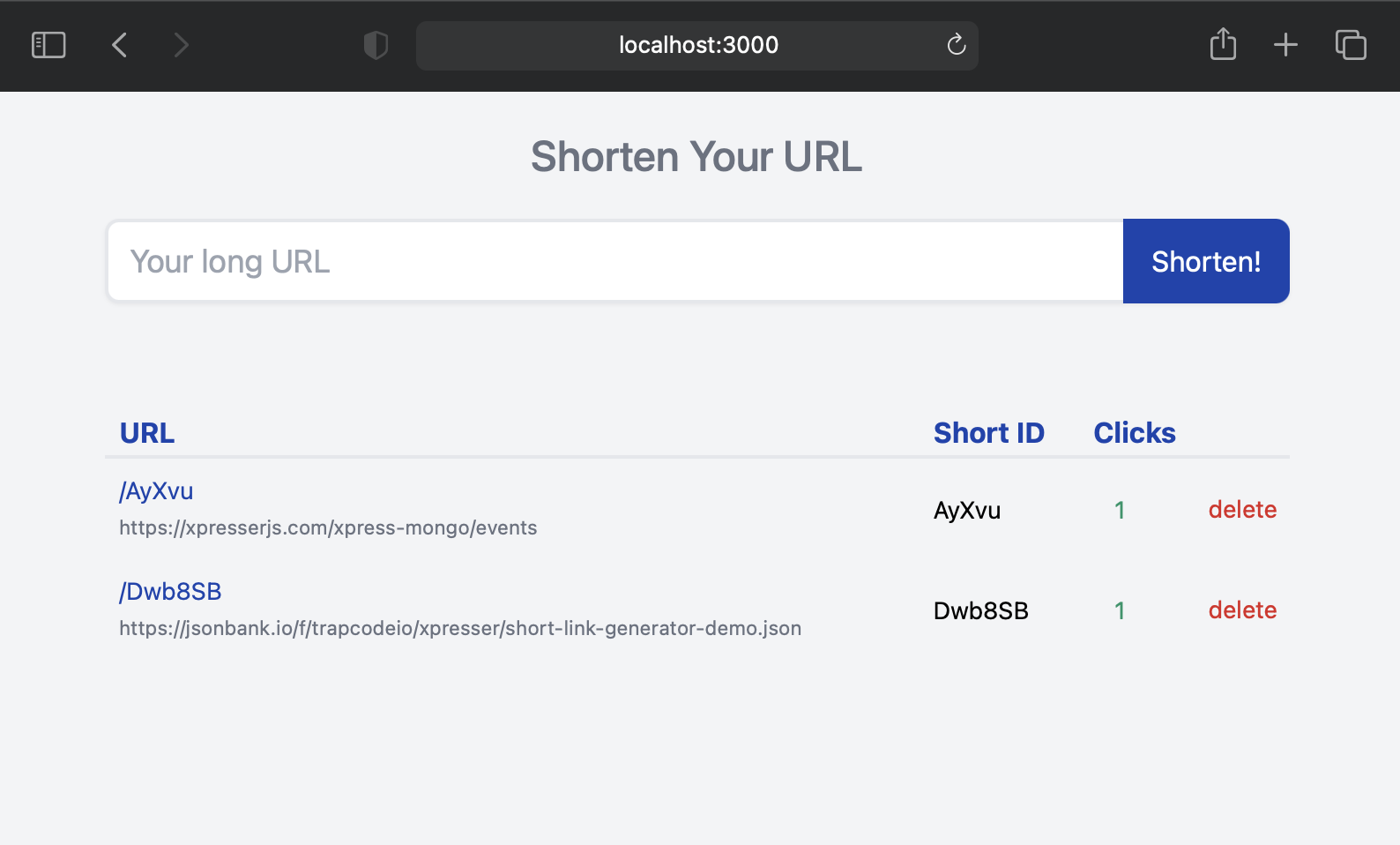
The above is a simple HTML page that shows a form to shorten urls with a table displaying shortened urls.
Control Requests
Empty file: backend/controllers/AppController.js and paste the code below.
module.exports = {

  name: 'AppController',

  /**
   * Index Page Action.
   * For route "/"
   */
  index(http) {
    return http.view('index');
  },
};
Preview
Run nodemon app.js in the project root folder and click the server URL to preview the HTML in index.ejs
i.e. http://localhost:3000

Making it work
Let's make this work with real values from the database.
Create Url Model
To create a model, run the command:
xjs make:model Url
Creates a model @ backend/models/Url.js.
Adding Database Schema
In your new model you will see default fields: updatedAt & createdAt. we need to add other fields like url
, shortId & clicks.
Note: The updatedAt field is not needed.
schema = {
  url: is.String().required(),
  shortId: is.String().required(),
  clicks: is.Number().required(),
  createdAt: is.Date().required()
};
Your model file should look exactly like
const {is, XMongoModel} = require("xpress-mongo");
const {UseCollection} = require("@xpresser/xpress-mongo");

class Url extends XMongoModel {
  // Set Model Schema
  static schema = {
    url: is.String().required(),
    shortId: is.String().required(),
    clicks: is.Number().required(),
    createdAt: is.Date().required()
  };
}

// Map Model to Collection `urls`
// .native() will be made available for use.
UseCollection(Url, "urls");

module.exports = Url;
Add Url
In our index.ejs file, the url form is sent via POST method to action: /shorten
Let's register path /shorten in the routes.js file.
Add this line to the end your routes file.
router.post('/shorten', 'App@shorten');
This simply means that we want the shorten method in AppController to handle the POST request to /shorten
Add shorten method
Before we add the shorten method, lets import the Url model at the top of AppController
const Url = require("../models/Url");
Then Paste the shorten method below in your AppController.
module.exports = {
  async shorten(http) {
    // Get url from request body.
    const url = http.body("url");
    // Generate short url using xpresser's randomStr helper.
    const shortId = http.$("helpers").randomStr(6)

    try {
      console.log(
          await Url.new({url, shortId})
      )
    } catch (e) {
      console.log(e)
    }

    return http.redirectBack()
  }
}
- First, Get the
urlsent by the frontend form. - Generate a shortId using xpresser's
randomStrhelper. - Try adding a new document to the database. Logs error or new URL document.
- Redirect back to sender i.e. frontend.
Let's test the progress so far.
Note: Because we made use of nodemon when running app.js earlier on, we don't need to refresh our server
since nodemon does that for you.
Refresh your browser, Then shorten a long url.
A look alike of the log below should show in your xpresser console logs before the request redirects back.
Url {
  data: {
    _id: 60c357723f80e72678b72ba7,
    url: 'https://xpresserjs.com/xpress-mongo/events',
    shortId: 'AyXvu',
    clicks: 0,
    createdAt: 2021-06-11T12:30:42.064Z
  }
}
The data above is saved to your database but our index.ejs does not show it yet. Now let's make our index.ejs use
dynamic values from the database.
Remember our index.ejs is rendered by the AppController@index controller route action. So that is where we will get
a list of URLs from the database and provide it to index.ejs
Modify the index method in AppController to look like so:
module.exports = {

  async index(http) {
    // Get all urls from db.
    const urls = await Url.find();

    // Share urls with index.ejs
    return http.view("index", {urls});
  },

}
Next lets modify index.ejs file to use the urls data provided. Change this section of your index.ejs file
Change the table body i.e. <tbody>
FROM
<!-- Url Table Body-->
<tbody class="mt-3">
<tr>
  <td class="p-2">
    <a href="#" target="_blank" class="text-blue-800">
      /AyXvu
    </a>
    <br>
    <small class="text-gray-500">
      https://xpresserjs.com/xpress-mongo/events
    </small>
  </td>
  <td class="p-2">AyXvu</td>
  <td class="p-2 text-green-600 pl-5">22</td>
  <td>
    <form method="POST" action="/delete" onsubmit="return confirmDeleteUrl(this)">
      <input type="hidden" name="shortId" value="realShortId">
      <button class="text-red-600">delete</button>
    </form>
  </td>
</tr>
</tbody>
TO
<!-- Url Table Body-->
<tbody class="mt-3">
<!--Loop Through Urls-->
<% for(const url of urls) { const shortUrl = "/" + url.shortId; %>
<tr>
  <td class="p-2">
    <a href="<%= shortUrl %>" target="_blank" class="text-blue-800">
      <%= shortUrl %>
    </a>
    <br>
    <small class="text-gray-500">
      <%= url.url %>
    </small>
  </td>
  <td class="p-2">
    <%= url.shortId %>
  </td>
  <td class="p-2 pl-5 text-green-600">
    <%= url.clicks %>
  </td>
  <td>
    <form method="POST" action="/delete" onsubmit="return confirmDeleteUrl(this)">
      <input type="hidden" name="shortId" value="<%= url.shortId %>">
      <button class="text-red-600">delete</button>
    </form>
  </td>
</tr>
<% } %>
</tbody>
Here we are looping through urls and displaying them on the table.
Reload the index page, and you should see the long URL(s) that were previously saved to the database.
 Clicking a shortUrl link will display xpresser's default
 404 Error Page and this is because we haven't declared the
route that will redirect our short URL to its long URL.
Handling short URL requests.
Let's create a route that will handle a short URL. Add the route below at the end of your routes file.
router.get("/:shortId", "App@redirect");
This means that we want the redirect method in AppController to handle GET request sent to /:shortId
Note: :shortId in the URL indicates a dynamic route parameter.
http://localhost:3000/abcdef
http://localhost:3000/uvwxyz
Given the example above :shortId represents abcdef and uvwxyz.
Create the redirect method.
Paste the redirect method below in your AppController.
module.exports = {
  async redirect(http) {
    // Get shortId from request params.
    const {shortId} = http.params;

    // find url using shortId
    const url = await Url.findOne({shortId});

    // if no url found then send a 404 error message.
    if (!url) return http.status(404).send(`<h3>Short url not found!</h3>`);

    // Increment clicks count.
    await url.updateRaw({
      $inc: {clicks: 1}
    });

    // redirect to long url
    return http.redirect(url.data.url);
  }
}
- First, we grab the
shortIdfrom the route url params. - Find the url using xpress-mongo's
findOnewhich returns a model instance when found ornullif not found. - If the result from DB is
nullwe return a 404 response. - Next, increment the clicks count.
- Redirect to long URL.
Now Refresh your browser and click any of the short links. You will be redirected to the long URL and the clicks count should update also.
Delete Url
The delete button when clicked and confirmed will show a /delete 404 Error Page and this is because we haven't
declared a route & controller action for it yet.
Let's add a POST /delete route before our redirect route. Your route file should be looking like this.
const {getInstanceRouter} = require("xpresser");
/**
 * See https://xpresserjs.com/router/
 */
const router = getInstanceRouter();

/**
 * Url: "/" points to AppController@index
 * The index method of the controller.
 */
router.get("/", "App@index").name("index");
router.post("/shorten", "App@shorten");
router.post("/delete", "App@delete");
router.get("/:shortId", "App@redirect");
Why delete before redirect route?
If the /delete route is placed after the /:shortId route, the router will assume the keyword delete is
a shortId route parameter because /:shortId was declared first.
Create the delete method
Paste the delete method below in your AppController.
module.exports = {
  async delete(http) {
    // Get shortId from request body.
    const shortId = http.body("shortId");

    // Delete from database
    await Url.native().deleteOne({shortId});

    return http.redirectBack();
  }
}
Refresh your browser and try the delete feature.
Hurray!! you now have your own URL shortener Application
Git Repo: https://github.com/xpresserjs/url-shortner-tutorial
Comments
Join the discussionVery detailed and easy to understand.
